



With how fast AI moves, scaling with it often feels like building a rocket while it’s launching.
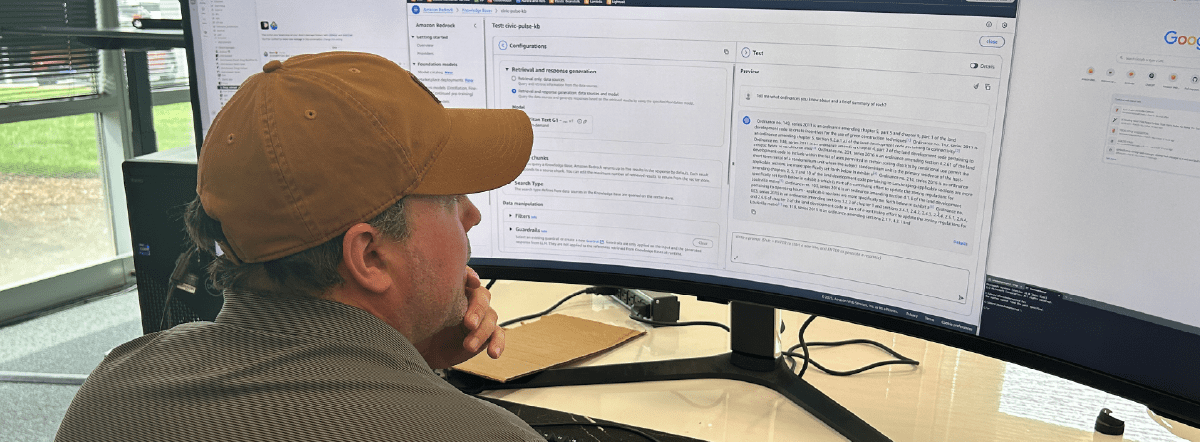
That was the backdrop when Slingshot began working with AWS Bedrock. We were already neck-deep in rapid prototyping, looking for a way to integrate large language models (LLMs) into client-facing tools without standing up our own model infrastructure.
The result? A fast-tracked relationship with Bedrock that delivered some solid wins, a few curveballs, and more than a few “ah-ha” moments.
If you’re a CIO evaluating LLM platforms, or trying to decide whether to go with Bedrock, Azure AI, Vertex AI, or roll your own, this breakdown offers a boots-on-the-ground view of what Bedrock gets right (and where it shows its seams.)
Summary
AWS Bedrock gave Slingshot a fast path to scalable AI without building custom infrastructure. It delivered strong security, multi-model flexibility, and helpful guardrails, but also surfaced challenges around latency, setup, and data prep. For teams already in AWS, it’s a powerful option with tradeoffs worth understanding.
Why Bedrock? (And Why Not the Others?)
First, the obvious: we’re an AWS shop. So when it came time to build with LLMs, Bedrock was in our backyard.
“We were in AWS first and foremost, so it was within our wheelhouse,” said Steve Anderson, Principal Developer at Slingshot. “It was quick and easy.”
That first project was CivicPulse: a civic engagement platform with AI-powered features. And because it already used other AWS services (like S3), plugging in Bedrock just made sense.
Other platforms weren’t off the table. We evaluated Google Vertex and were aware of Microsoft’s Azure AI options, but when workloads already lived in AWS, Bedrock felt like the low-friction bet.
Chris Howard, Slingshot’s CIO, summed it up: “If you’re already in the AWS cloud, and you had the choice between AWS Bedrock or building your own RAG [retrieval augmented generation] and large language model, I definitely think you should look at Bedrock first.”
What Worked: The Pleasant Surprises
Let’s start with the good stuff! Once initial setup hurdles were cleared (more on that later), Bedrock revealed unexpected capabilities we hadn’t anticipated:
The first surprise was how much infrastructure we didn’t have to build ourselves. “We were pleasantly surprised to see features that we didn’t have to roll out ourselves,” Steve said, referencing Bedrock’s built-in support for RAG and vector databases. That saved time and gave us a faster path to usable prototypes, especially for knowledge-based interfaces.
Another standout was Bedrock’s guardrails. Designed to support responsible AI usage, these built-in content filters became increasingly valuable across projects. They helped ensure safer interactions, especially in tools exposed to public or semi-public users, and gave us more control without needing to spin up custom logic.
And then there was model switching: “Bedrock was one of the first tools I used where I could quickly switch between models and see how they differ in response,” Chris noted. That kind of flexibility made it easy to compare Titan, Llama, and Claude side-by-side and choose the best model for the task, without changing the underlying system architecture.
What Broke: Pain Points and Limitations
But it wasn’t all plug-and-play.
Setup friction came first. As Steve put it, “Some of the initial permission configuration was a little bumpy and could have been more straightforward.” Getting Bedrock integrated with IAM and internal services wasn’t out-of-the-box simple.
Latency was another issue. “It’s a little jarring for a user,” Steve said. Without streaming enabled, some interactions felt sluggish. “You’re sitting there for a few seconds while you’re waiting on the LLM to respond.” That meant rethinking the front-end UX to accommodate delays better and minimize user impatience.
Then there was model availability. While Bedrock includes Claude and Titan, it doesn’t support OpenAI’s models, which are some of the most popular models. “If your solution needs OpenAI, it may be worth going straight to that provider. It’s within Azure AI.” Chris noted.
Finally, data preparation emerged as an invisible cost. Documents had to be chunked, tagged, and restructured to work effectively with Bedrock’s RAG pipeline. “We underestimated the time required to get better results,” said Chris. “There’s a learning curve with how you organize and break down your data.”
Cost Considerations: Not a Free Ride
No surprise here: LLM infrastructure isn’t cheap.
“You have to have a ballpark idea of what that’s going to run you,” Steve advised. “You can’t just go into it blind and say, ‘Go generate stuff.’”

Each model in Bedrock has a different cost-per-token, and workloads can rack up charges quickly if you’re not monitoring usage. Amazon’s Titan models may be competitively priced, but usage patterns and compute needs will ultimately drive your spend.
The team didn’t notice significant cost differences between using Bedrock and going directly to vendors like Anthropic, but that calculus will vary based on your architecture.
Chris added, “I think Bedrock is more capable than just a knowledge base. But if you had an internal company knowledge base, it just seems like a perfect fit.”
Security and Scale: Where Bedrock Shines
For enterprise use cases, two things matter most: scalability and security. Bedrock scores well on both.
Data stays inside your AWS environment. “It doesn’t leave your VPC,” Steve noted. “So that compute is not going out to the model vendors. It’s staying in AWS.” If you’re already trusting AWS with your data, using Bedrock doesn’t introduce new exposure.
And scaling? That’s the magic of the cloud. “We don’t have to worry about the hardware that these things are running on,” Steve continued. “If you manage it yourself, you have to have enough capacity to handle your peak loads. That’s an expensive proposition. It is nice to offload that to AWS and just pay for what you use.”
Plus, there’s no risk of accidentally training the foundational model with your prompts, a concern for CIOs working in regulated environments. “Whatever you’re running through Bedrock via your inference calls is not being ingested by that model to learn,” Steve confirmed.
The Curveballs: Things We Didn’t Expect
Every new tool has its quirks, and Bedrock delivered a few surprises: some good, some not so good.
- Guardrails Became a Core Feature: Initially seen as a bonus, guardrails later became mission-critical. “In subsequent projects, those guardrails became really valuable,” Chris said.
- Data Prep Is a Bigger Lift Than You Think: You can’t just drop a 50-page document into a knowledge base and expect magic. “There’s some trial and error involved. You have to play around with prompting, chunking, and model selection,” Chris explained.
- It Changes How You Design UX: The initial delay in responses pushed the team to reconsider how users interact with the app. Streaming responses helped, but it wasn’t initially obvious.
And finally, trial and error never goes away. Even with Bedrock’s managed environment, achieving optimal performance requires experimenting with models, prompts, and formatting.
Final Thought: Is Bedrock the Right Bet?
If your infrastructure already lives in AWS, Bedrock is a strong contender. It’s secure, scalable, and comes with a growing list of managed AI tools, including vector search, guardrails, and multi-model support.
But don’t expect a magic button. There’s still significant effort required to optimize performance, manage costs, and tailor the user experience. As Chris put it: “It’s simple, but not simplistic.”
So what’s next? For Slingshot, Bedrock is in the mix, but we’re always evaluating whats out there. And you should too; after all, AI is moving at the speed of light., You don’t want to get left behind.
The bigger takeaway for CIOs: think strategically about model governance, user experience, and the operational cost of experimentation. You don’t need to build everything yourself, but you do need to understand what you’re building on.
More AI Tool Talk?

Written by: Savannah Cherry
Savannah is our one-woman marketing department. She posts, writes, and creates all things Slingshot. While she may not be making software for you, she does have a minor in Computer Information Systems. We’d call her the opposite of a procrastinator: she can’t rest until all her work is done. She loves playing her switch and meal-prepping.

Expert: Chris Howard
Chris has been in the technology space for over 20 years, including being Slingshot’s CIO since 2017. He specializes in lean UX design, technology leadership, and new tech with a focus on AI. He’s currently involved in several AI-focused projects within Slingshot.

Expert: Steve Anderson
Steve is one of our AWS certified solutions architects. Whether it’s coding, testing, deployment, support, infrastructure, or server set-up, he’s always thinking about the cloud as he builds. Steve is extremely adaptable, and can pick up the project and run with it. He’s flexible and able to fill in where needed. In his spare time, he enjoys family time, the outdoors and reading.
Frequently Asked Questions
Yes, especially if your infrastructure is already in AWS. Bedrock integrates easily with other AWS services, supports multiple foundation models, and keeps data within your VPC for added security.
Key friction points include IAM configuration, limited model availability, and latency without streaming. Data prep for RAG pipelines also requires more effort than expected to achieve good performance.
No. Bedrock does not offer OpenAI models. If you require GPT-4, Azure OpenAI may be a better fit. Bedrock does support Anthropic Claude, AWS Titan, and Meta’s Llama models.
Bedrock processes inference calls within your AWS environment. Data does not leave your VPC or train the foundational models, which supports compliance and governance requirements.
Each model has a different pricing structure. While Titan is cost-effective, high usage or complex prompts can increase costs quickly. Monitoring token use and optimizing architecture are essential.
